Projection of PCA onto the First Principal Component (PC1)
Principal Component Analysis (PCA) identifies directions in a dataset along which variance is highest. These directions are the principal components. In 2D, the first principal component (PC1) points in the direction of maximum variance. Projecting points onto PC1 produces the most informative 1D representation of the data.
1. Covariance Matrix and Principal Components
Start with the covariance matrix:
C = [[4, 2],
     [2, 3]]
Eigen-decomposition gives eigenvalues and eigenvectors. The eigenvector corresponding to the largest eigenvalue is PC1.
2. Data Simulation and Projection
Generate centered 2D data from the covariance matrix, then project each point onto PC1:
Z = X @ W
Here, W is the PC1 unit vector. Reconstruct the projection in 2D:
X_reconstructed = Z @ W.T
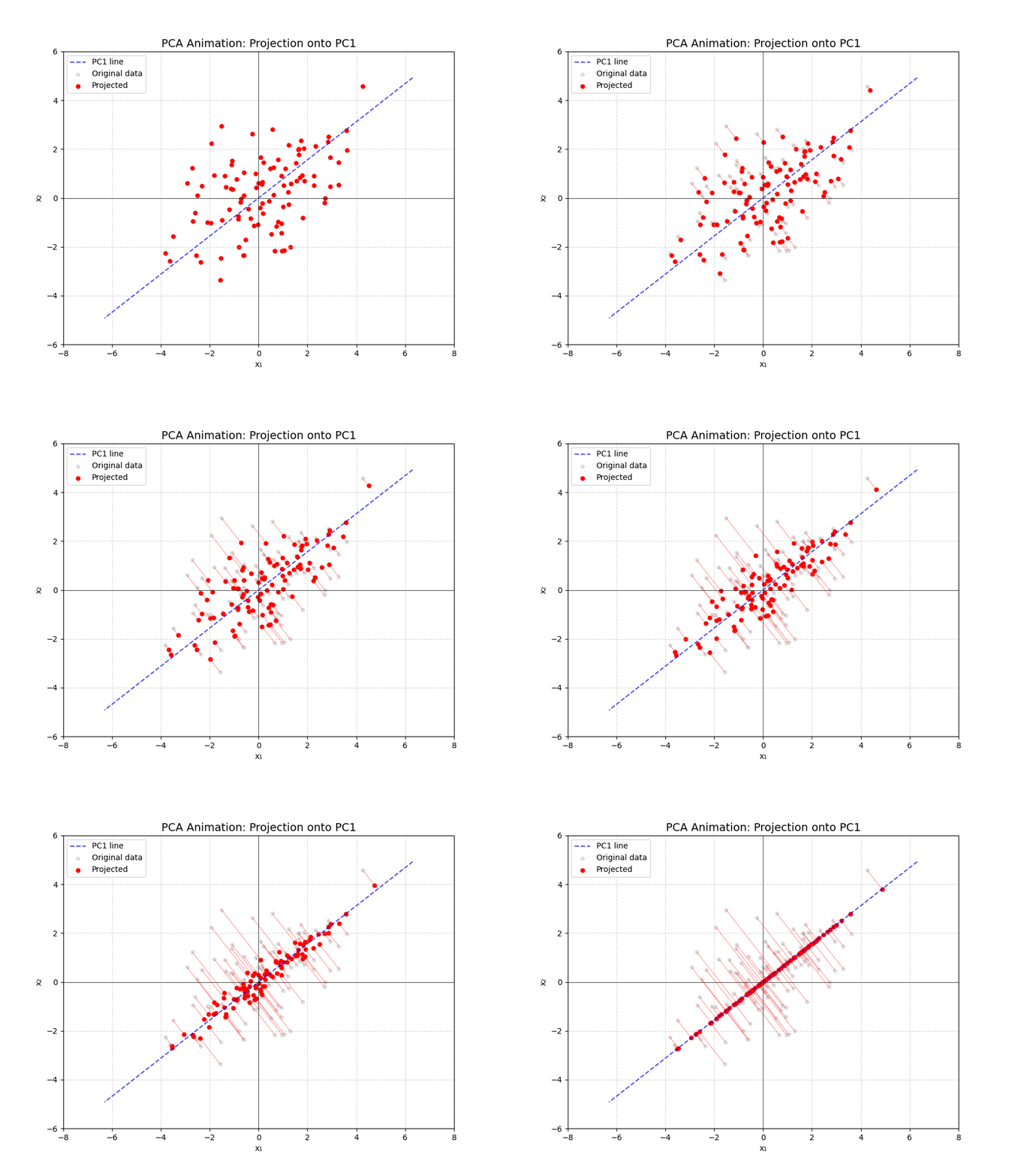
All reconstructed points lie exactly on the PC1 line, representing a one-dimensional compression of the data.
3. Animation: Projection onto PC1
The animation below shows points moving from their original positions to their projections on PC1. Dashed blue line = PC1 direction; red points = projected locations.
4. Python Code
Full script used to generate the animation:
import numpy as np
import matplotlib.pyplot as plt
from matplotlib.animation import FuncAnimation

# Covariance matrix
C = np.array([[4, 2],
              [2, 3]])

# Eigen-decomposition
eigenvals, eigenvecs = np.linalg.eigh(C)
idx = eigenvals.argsort()[::-1]
eigenvals = eigenvals[idx]
eigenvecs = eigenvecs[:, idx]

pc1 = eigenvecs[:, 0]  # First principal component

# Simulate centered data
np.random.seed(42)
n_samples = 100
X = np.random.multivariate_normal([0, 0], C, size=n_samples)

# Project and reconstruct
W = pc1.reshape(-1, 1)
Z = X @ W
X_reconstructed = Z @ W.T

# Setup plot
fig, ax = plt.subplots(figsize=(9, 7))
ax.set_xlim(-8, 8)
ax.set_ylim(-6, 6)
ax.set_aspect('equal')
ax.axhline(0, color='black', linewidth=0.5)
ax.axvline(0, color='black', linewidth=0.5)
ax.grid(True, linestyle='--', alpha=0.5)
ax.set_title('PCA Animation: Projection onto PC1')
ax.set_xlabel('x₁')
ax.set_ylabel('x₂')

# Plot PC1
t_line = np.linspace(-8, 8, 200)
pc1_line = np.outer(t_line, pc1)
ax.plot(pc1_line[:, 0], pc1_line[:, 1], '--', color='blue', alpha=0.7)

# Original points
ax.scatter(X[:, 0], X[:, 1], color='lightgray', alpha=0.7, s=20)

# Animated elements
lines = []
recon_points = ax.scatter([], [], color='red', s=25)
for i in range(n_samples):
    line, = ax.plot([], [], 'r-', alpha=0.4, linewidth=0.8)
    lines.append(line)

def animate(frame):
    alpha = min(frame / 50, 1.0)
    current_recon = (1 - alpha) * X + alpha * X_reconstructed
    recon_points.set_offsets(current_recon)
    for i in range(n_samples):
        lines[i].set_data([X[i, 0], current_recon[i, 0]],
                          [X[i, 1], current_recon[i, 1]])
    return [recon_points] + lines

anim = FuncAnimation(fig, animate, frames=70, interval=50, blit=True)
anim.save('pca_projection.gif', writer='pillow', fps=20)
This visualization highlights PCA’s geometric meaning: PC1 preserves the most variance, and projecting the data collapses it onto that optimal line.